Adding a Tesla Powerwall to an existing solar system: how it works in California (2026)
Yes — a Powerwall 3 retrofits onto almost any existing solar system via AC coupling, keeps your NEM status, and runs $14,500-$18,500 installed for one unit.
By Taylor Crouse — Founder, Helios Energy GlobalPublished
Quick answer
- Yes — a Tesla Powerwall 3 can be added to almost any existing solar system, whatever brand of panels or inverter you have. The retrofit is AC-coupled: your existing solar stays exactly as it is, and the Powerwall connects on the AC side of your panel.
- Adding a Powerwall does not cost you your NEM 1.0 or NEM 2.0 grandfathering — the CPUC treats paired storage as part of your existing system. (Full detail in our battery retrofit guide.)
- 2026 installed cost: roughly $14,500–$18,500 for one Powerwall 3; $24,000–$30,000 for two — see the full Powerwall 3 cost breakdown.
- It works with orphaned systems too — if your original installer is gone (SunPower and others), the panels are almost always fine, and a Powerwall retrofit is a common way to bring the system back under active care.
- Typical install is one day on site, after permitting and utility paperwork we handle.
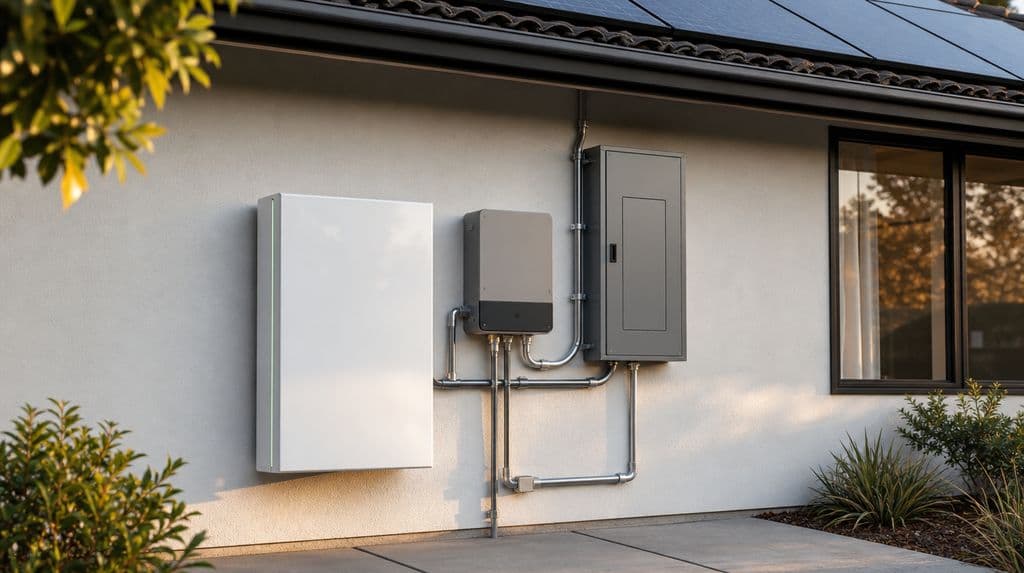
Southern California homeowners with existing solar are adding batteries faster than any other group we serve, and the Powerwall 3 is what most of them ask for by name. Here's exactly how the retrofit works, what it costs, which existing systems it pairs with, and where the honest catches are.
Last verified: August 2026 by Helios Energy Global.
How a Powerwall 3 connects to solar you already have
The Powerwall 3 was designed with an integrated solar inverter, which matters for new systems. For a retrofit, that detail is mostly irrelevant — your existing solar already has its own inverter, and it keeps doing its job. The Powerwall connects to your home's electrical panel on the AC side (this is what "AC-coupled" means), charges from your solar's surplus AC output, and discharges to run the house when you want stored power instead of grid power.
Two pieces of hardware make the backup function work:
- Backup Gateway (or Backup Switch): installed at your service entrance, it detects an outage and disconnects your home from the grid in a fraction of a second, so the Powerwall can power the house safely while lines are down.
- The Powerwall 3 itself: 13.5 kWh of usable storage per unit, with enough continuous power (11.5 kW) that a single unit can start and run most home loads, including many central AC condensers — something older battery generations struggled with.
Because the retrofit doesn't touch your panels, your racking, or your existing inverter, there's no re-engineering of the solar itself — and no risk to your existing equipment warranties.
Which existing systems it works with
- Enphase microinverters: fully compatible. Your micros keep producing on the AC side; the Powerwall charges from that output. (If you're deciding between adding a Powerwall or extending an Enphase system with IQ Batteries, our Powerwall 3 vs. Enphase comparison walks the trade-offs honestly.)
- String inverters (SMA, Fronius, GoodWe, Growatt and others): fully compatible via AC coupling — this is the most common retrofit we do.
- SolarEdge (optimized string): compatible the same way. The SolarEdge inverter keeps running the panels; the Powerwall sits alongside it.
- Orphaned SunPower systems: yes. With SunPower's bankruptcy, thousands of California homes have working panels and dead monitoring. The panels themselves are almost always fine. A Powerwall retrofit — usually paired with a repair and health check — restores monitoring through the Tesla app and puts the whole system back under an active installer's care.
- Very old or failing inverters: if your existing inverter is near end-of-life, we'll tell you plainly — sometimes the smarter move is replacing it in the same project rather than coupling new storage to failing electronics.
One honest constraint: Tesla's design rules limit how much existing solar a given number of Powerwalls can AC-couple with. Large systems occasionally need a second unit or a design adjustment — that's a real engineering check we run before quoting, not after.
What it costs in 2026
A single Powerwall 3 retrofit in Southern California typically lands at $14,500–$18,500 installed — the unit, the Backup Gateway or Backup Switch, electrical work, permits, and commissioning. Two units for whole-home backup with more endurance run $24,000–$30,000. What moves the number: main-panel condition (an upgrade adds $3,000–$5,000 when genuinely needed — and we call it out before you sign, never mid-project), wire-run distance, and your city's permit process. The Powerwall 3 cost page breaks down where the money goes and how payback differs by utility.
On incentives, the honest 2026 picture: the federal residential credit (25D) expired December 31, 2025 and does not apply to a battery-only retrofit. SGIP — California's battery rebate — still exists for customers of SCE, PG&E, SDG&E and SoCalGas: the general-market tier is modest and demand-dependent, while the Equity Resiliency tier pays $1,000/kWh and can cover most of a Powerwall's cost for homes that qualify (medical-baseline households and high-fire-threat/PSPS-affected areas, among others). We check your address against the live SGIP tiers during design — no invented rebates. Note that SGIP is a CPUC program: LADWP and other municipal-utility customers aren't eligible, though munis periodically run their own programs, which we verify at design time.
Does adding a Powerwall change my net metering?
No — and this is the question that stops most people from acting. Under CPUC rules, storage added to an existing NEM 1.0 or NEM 2.0 system is treated as part of that system: your grandfathered export rates survive the retrofit. If you're on NEM 3.0 (interconnected after April 2023 with SCE, PG&E or SDG&E), the battery isn't a risk to your tariff — it's the engine of it, shifting your solar's value from ~5¢ exports to 30–58¢ avoided peak purchases. And on LADWP, which never adopted NEM 3.0 and still credits exports at retail-like rates (~28¢ effective), a Powerwall is less about economics and more about outage resilience — we'll tell you that straight rather than sell you a battery your tariff doesn't need. The per-utility math lives in our battery retrofit guide and the NEM 3.0 explainer.
What the retrofit process looks like
- Assessment. We pull your interconnection paperwork and usage, confirm what your existing system actually is (brand, inverter, age, condition), and run Tesla's coupling rules against it.
- Design and quote. Owner-reviewed, transparent pricing that holds still while you compare. If a main-panel upgrade is needed, it's in the quote from day one.
- Permits and utility paperwork. We handle the city permit (instant in many SoCal cities via SolarAPP+ and similar) and the utility's storage addendum — including the NEM-paired-storage filings that protect your grandfathering.
- Install day. Most single-Powerwall retrofits are one day on site: mount, Gateway install, wiring, commissioning, and the Tesla app live before we leave.
- Permission to operate. The utility's final sign-off timeline varies — days on some munis, longer on the IOUs — and we chase it so you don't have to.
Frequently asked questions
Can I add a Powerwall to a system another company installed? Yes — most of our Powerwall retrofits are on systems we didn't originally install. As a Tesla Certified Installer, we can install, commission, and service Powerwalls on any home, and the retrofit brings your whole setup under our 10-year workmanship warranty for the work we perform.
My installer went out of business. Does that block anything? No. You own the system, and nothing about a defunct installer prevents a battery retrofit. We run a health check first (see our solar repair page), fix what needs fixing, and proceed.
Will one Powerwall back up my whole house? Often, with smart load management — 11.5 kW continuous starts most central AC units. For long outages or all-electric homes, two units buy real endurance. We model your actual loads and outage priorities rather than guessing.
How long does the whole project take? Install day is typically one day. End to end — assessment to permission-to-operate — plan on a few weeks, driven mostly by permitting and utility timelines in your city.
Is it worth it without the federal credit? On NEM 3.0, usually yes — the battery is what makes the solar math work at all. On grandfathered NEM 1.0/2.0 or LADWP, it's a resilience decision more than a payback one, and we'll show you both numbers honestly before you decide.
Ready to see the numbers for your exact system? Get a free assessment — we'll verify compatibility, check live incentives for your address, and give you a transparent, owner-reviewed quote.
More guides
Best Solar Companies in Jurupa Valley, CA (2026): A Homeowner's Honest Guide
Jurupa Valley homeowners get 5.9 peak sun hours and face Southern California Edison's NEM 3.0 net billing rules — making battery pairing and installer expertise more important than ever. Here's how to choose wisely in 2026.
ReadSCE Power Outage or Public Safety Power Shutoff? How to Check the Map, How Long It Lasts, and How to Keep the Lights On
SCE posts estimated restoration times on its outage map at sce.com/outagemap; after a PSPS, line inspections alone can add up to 8 hours or more before power comes back — a home battery is the only solar-based backup that works during a shutoff.
ReadWhat Happens to Solar Panels When You Sell Your House in California (2026)?
Owned solar adds roughly 4–6% to a California home's resale value — but how you financed it (owned outright, solar loan, lease, or PPA) determines what happens at closing.
ReadGet a free consultation and custom design.
No pressure, no obligation — the owner reviews every design we send.